| Pros | Cons |
| Latenode is accessible to both non-technical users and developers, offering easy no-code automation and more complex low-code features. | More advanced workflows and integrations may take time to master, especially for users with no prior automation experience. |
| Leverage AI-powered features to automate complex tasks, offering smarter decision-making and advanced automation capabilities. | Latenode supports many integrations, but some niche applications may not be covered. |
| Offers flexible pricing plans, including a free plan for basic workflows, making automation accessible to businesses of all sizes. | Advanced features such as API access and custom integrations are available only with premium plans. |
| Latenode provides granular control over workflows, allowing users to customize triggers, actions, and error handling for complex automation. | Large, multi-step workflows may experience delays or slow performance, depending on their complexity. |
| Suitable for businesses of all sizes, with a platform that can scale as your automation needs grow. | Users on the free plan may not receive the same level of support as those on premium subscriptions. |
| The drag-and-drop interface makes it easy to design and manage workflows, even for those without technical expertise. | More complex workflows require additional configuration and may be more challenging for beginners. |
As no-code and low-code automation options continue to rise in popularity, Latenode has emerged as a key player in streamlining business operations. This automation platform is designed for those who need to optimize workflows without the need for complex coding knowledge. Latenode stands out because of its ability to connect various applications, automate tasks, and allow businesses to improve productivity simply and efficiently. In 2025, Latenode remains a top choice for those looking to implement seamless automation systems, regardless of technical skill.
The core strength of Latenode lies in its accessibility. It offers both no-code and low-code functionality, meaning that users without coding experience can set up workflows quickly. At the same time, developers have the flexibility to add custom elements where needed, making it suitable for a wide range of applications. This accessibility puts Latenode in the same sphere as other automation solutions, where AI integration plays an increasingly important role. Take Alaya AI, for instance, where businesses are guided in making decisions by utilizing automated systems to enhance productivity, similarly to how Latenode allows businesses to create automated processes with minimal effort.
Another significant feature of Latenode is its ability to automate tasks seamlessly across various applications. Whether it’s syncing data between your CRM, sending automatic reminders, or integrating with other business tools, Latenode simplifies the process. It’s a great choice for businesses that need to keep their operations running smoothly, without requiring a developer to write custom code for every task. Through its easy interface, users can design workflows, set up triggers, and automate actions between apps. In this way, businesses can spend less time on repetitive tasks and focus more on growth and strategy.
The Latenode free plan is particularly attractive for those just starting out. It provides users with a range of essential features, allowing them to explore the platform’s capabilities without any financial commitment. For users who need advanced features, the premium plans offer even more flexibility and access to powerful tools like the Latenode API. This flexibility ensures that Latenode can be a cost-effective solution for businesses of any size, whether just getting started or scaling rapidly.
When we consider the growing demand for AI-powered automation, Latenode plays a crucial role in meeting those needs. With its ability to integrate easily with multiple applications and automate complex workflows, it’s a tool that caters to both business owners and developers. As businesses continue to rely more on AI to handle repetitive tasks, platforms like Latenode are providing the necessary infrastructure to ensure operations can continue with maximum efficiency.
In 2025, Latenode remains a strong choice for businesses that are serious about adopting automation without the complexities of traditional programming. Its user-friendly interface, paired with the powerful capabilities of AI agent features, means that businesses can scale their processes efficiently and effectively.
How to Use Latenode: A Step-by-Step Guide
Step 1: Sign Up and Access Dashboard
To get started with Latenode, you first need to sign up for an account on the Latenode official website. After signing up, you’ll be directed to the Latenode dashboard, where you can start building your automation workflows. The interface is clean and user-friendly, ensuring even those new to automation can easily navigate the platform.
Step 2: Start a New Workflow
Once you’re logged in, select the option to create a new workflow. Latenode allows you to define your workflow from scratch, giving you complete control over the automation process. You can name your workflow, choose a trigger, and start adding actions right from the dashboard.
Step 3: Add a Trigger
Triggers are the starting points for automation. Latenode automation platform allows you to add multiple types of triggers depending on your workflow. For example, you can set triggers based on events like receiving an email, a change in a Google Sheet, or a specific action on your website.
Step 4: Add Actions
After selecting your trigger, the next step is to define the actions that will be carried out when the trigger occurs. Whether it’s sending a message, updating a CRM, or creating a task, Latenode provides an extensive list of supported actions that can be added to your workflow. These actions are customizable, allowing you to tailor them according to your needs.
Step 5: Configure and Test
Once the actions are in place, Latenode offers a feature to configure and test the workflow before going live. Testing ensures everything works as expected and that your automation will run smoothly when triggered.
Step 6: Activate and Monitor
Finally, after configuring your workflow, you can activate it. Once live, Latenode provides monitoring features to track the performance of your automation. You’ll be notified of successful actions, errors, or failures in real-time, which ensures you can make adjustments as needed.
What is Latenode?
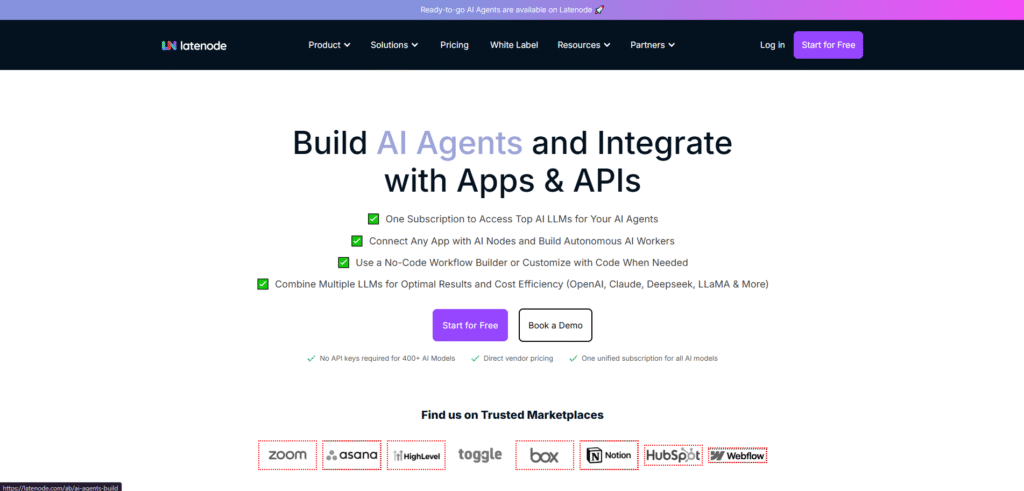
Latenode is a versatile no-code automation platform that enables users to automate workflows, integrate various applications, and streamline business processes without requiring any coding expertise. Designed to be intuitive and user-friendly, Latenode allows both non-technical users and developers to create complex workflows easily, saving valuable time and resources in the process.
At its core, Latenode enables users to set up workflows that automate routine tasks across different platforms and services. Whether it’s automatically updating a CRM, sending email notifications, or synchronizing data between apps, Latenode provides a seamless solution for businesses looking to reduce manual effort and increase productivity. For developers or more technical users, Latenode also offers a low-code integration platform, allowing for greater customization and flexibility within workflows.
The platform stands out due to its AI-powered features. For businesses looking to integrate AI into their workflows, Latenode offers advanced tools to streamline processes like data entry, customer support automation, and even content creation. Just like how Novel AI leverages AI to assist in generating text for various creative projects, Latenode incorporates AI agents to help automate complex workflows, making the process more efficient and intelligent.
Latenode is also known for its scalability. As businesses grow, the platform offers the ability to handle increasingly complex tasks. Whether you’re running a small operation or a large enterprise, Latenode provides the necessary flexibility to accommodate growing demands. With integrations to popular tools and services, businesses can quickly automate processes across multiple systems, leading to better time management and fewer manual errors.
The Latenode free plan gives users the ability to explore the platform and create basic workflows without committing to a paid subscription. This makes it a great choice for startups, small businesses, or individuals just starting their automation journey. However, for those who need more advanced features, like the Latenode API, higher-tier plans provide greater functionality, allowing for deeper customization and integration.
Latenode serves as a powerful tool for both small businesses and large enterprises looking to embrace automation and AI without the complexity of traditional development. With its intuitive interface, flexible integration options, and AI-driven capabilities, Latenode continues to be a top choice for companies looking to streamline their operations and focus on growth.
Benefits of Using Latenode
1. Cost-Effective Automation
One of the standout benefits of using Latenode is its cost-effective automation solution. As businesses increasingly turn to automation, keeping operational costs low is essential. With Latenode, businesses can implement powerful automation workflows without incurring the high costs often associated with traditional development and complex automation tools. Whether you’re automating simple tasks like sending emails or more complex processes, Latenode provides an affordable way to save time and resources. The platform offers a free plan that allows businesses to test the tool’s capabilities before committing to paid plans. For companies looking for flexibility and scalability, Latenode pricing ensures that the platform remains accessible as your business grows.
2. AI-Powered Flexibility
Another significant advantage of Latenode is the ability to incorporate AI-powered flexibility into workflows. With Latenode AI capabilities, users can build more intelligent automation solutions that go beyond simple task execution. Whether it’s using AI to analyze data, predict outcomes, or automate customer support, Latenode AI provides powerful tools that enhance automation beyond basic processes. For example, much like how Leonardo AI transforms creative processes with AI-powered capabilities, Latenode gives businesses the ability to introduce sophisticated AI elements into their workflows. This allows for more advanced applications such as personalized marketing or predictive analytics, increasing the overall impact of automation.
3. No-Code and Low-Code Options
One of the key features that makes Latenode so appealing is its no-code and low-code approach to automation. With Latenode, users don’t need to be developers to create complex workflows. The platform’s no-code automation allows anyone, from business owners to marketing teams, to build workflows simply by dragging and dropping elements. For those with coding experience, Latenode also offers low-code options, enabling more customized and advanced workflow configurations. This flexibility ensures that Latenode is accessible to a wide range of users, providing a robust solution for both non-technical and technical individuals.
4. Advanced Workflow Control
Latenode gives users full control over their automation workflows, enabling them to create detailed, multi-step processes that can handle a variety of business needs. Whether it’s setting conditional triggers, handling errors, or integrating data across multiple platforms, Latenode’s advanced features allow businesses to fine-tune their workflows to perfection. This level of control means that businesses can automate processes with precision, ensuring that each step is executed seamlessly. The intuitive interface makes it easy to create and monitor workflows, and businesses can ensure that their automation aligns with specific goals.
5. User-Friendly and Supportive
A key feature that sets Latenode apart is its user-friendly interface. The platform is designed with simplicity in mind, making it easy for even non-technical users to get started with automation. The drag-and-drop interface, along with clear instructions and tutorials, makes setting up workflows a breeze. Additionally, Latenode provides robust support through documentation and a responsive customer service team. Whether you’re new to automation or an experienced developer, Latenode’s comprehensive support resources ensure that you’ll have everything you need to get the most out of the platform.
Who Should Use Latenode?
Latenode is a versatile platform designed for a wide range of users, from entrepreneurs to developers, thanks to its flexibility and ease of use. With its no-code and low-code capabilities, Latenode empowers users to automate complex tasks and integrate various applications without the need for extensive coding knowledge. The platform is built to help users across multiple industries streamline workflows, optimize business processes, and leverage AI-powered automation efficiently.
1. Entrepreneurs and Small Businesses
Latenode is an ideal solution for entrepreneurs and small businesses who want to automate processes without investing in expensive software development. Small businesses can use Latenode to automate repetitive tasks like scheduling, customer communication, and data entry, saving valuable time and resources. The platform’s no-code automation features allow entrepreneurs to set up workflows that integrate their tools and improve efficiency. By adopting Latenode, businesses can focus more on growth and strategy rather than getting bogged down by manual processes.
This is similar to the way businesses leverage other AI-driven tools to simplify their operations. Just as Scite AI helps researchers save time by providing automated analysis, Latenode provides an easy way for small businesses to automate their workflow and focus on scaling their operations.
2. Teams Managing Multiple Apps
Teams that rely on multiple software applications often find themselves spending significant time switching between apps and manually entering data. With Latenode, businesses can integrate all their applications into a unified workflow, eliminating this manual data entry. The platform enables seamless communication between apps like CRMs, email marketing platforms, and project management tools, ensuring data is synced across all systems.
Latenode also offers the ability to automate complex workflows involving multiple tools. This integration and automation enhance team collaboration and overall productivity. For teams working with various platforms, this feature is invaluable, as it reduces human error, improves data accuracy, and accelerates project timelines.
3. Developers and Tech-Savvy Users
For developers and those with technical expertise, Latenode offers low-code options that allow for custom automation workflows. Developers can create advanced workflows using Latenode’s API, integrate third-party tools, and automate complex business processes. The Latenode API gives developers full control over data flow and customization, making it an excellent tool for creating tailored automation solutions.
In the same way, Dezgo AI offers an advanced AI-powered approach to automation and creative content, and Latenode enables tech-savvy users to integrate more sophisticated automation features. Whether you’re building custom integrations or leveraging AI agents for automated decision-making, Latenode provides the necessary tools to meet the demands of even the most technical users.
Quick Steps to Download Latenode
1. Visit the Official Website
To begin using Latenode, the first step is to visit the Latenode official website. Here, you can find detailed information about the Latenode automation platform, its features, and the pricing options available. The website provides all the necessary details to understand the capabilities of Latenode, including the AI-powered flexibility it offers for automating workflows.
2. Create Your Account
Once you’re on the Latenode official website, sign up to create your account. This process is simple and only requires a few details. Whether you’re signing up for the Latenode free plan or opting for one of the paid plans, the sign-up process grants you immediate access to the platform’s core features, including its low-code integration capabilities. After registering, you’ll be able to start creating workflows and automating processes right away.
3. Access the Platform
After creating your account, log in to access the Latenode automation platform. The platform’s dashboard is intuitive and user-friendly, allowing you to start building automation workflows immediately. From here, you can begin integrating apps, setting triggers, and creating automation with just a few clicks. The Latenode features will be at your disposal, providing you with everything you need to streamline your workflows and enhance business productivity.
How to Cancel Latenode Subscription
If you’ve decided to cancel your Latenode subscription, the process is simple and can be done directly through your account on their platform. Start by logging into your account on the Latenode official website. Once you’re signed in, head over to your account settings, where you’ll find the subscription management section. Here, you can review your current plan details and select the option to cancel your subscription. Follow the prompts to confirm the cancellation.
It’s important to remember that canceling your subscription won’t immediately cut off your access to Latenode. You will still be able to use the features of the platform until the end of your current billing cycle. If you’re uncertain about the process or run into any issues, resources like the Digital Software Labs AI review provide in-depth guides and valuable insights about managing AI-driven tools and platforms like Latenode, which can assist you in making an informed decision.
If you are on a paid plan, you may also want to ensure that there are no remaining charges after cancellation, as sometimes certain add-ons or premium features might have separate billing cycles. Always double-check the terms before finalizing your cancellation to avoid any unexpected charges.
Pricing Latenode
| Plan | Features | Cost |
| Free Plan | Basic automation, limited integrations, and access to Latenode features for small workflows. | Free |
| Starter Plan | Includes more automation actions, access to premium integrations, and higher task limits. | $15/month |
| Professional Plan | Full access to all features, unlimited workflows, Latenode API access, and advanced integrations. | $40/month |
| Enterprise Plan | Custom features, priority support, and tailored solutions for large teams and complex workflows. | Contact for pricing |
What Are the Best Alternatives to Latenode?
| Feature | Latenode | Zapier | Make (formerly Integromat) | n8n |
|---|---|---|---|---|
| Primary Use | Automating workflows and building no-code integrations with APIs and databases | Automates workflows by connecting apps to streamline tasks and actions | Visual workflow automation platform for integrating apps and automating tasks | No-code workflow automation with self-hosting options and unlimited integrations |
| Key Features | No-code automation, API integrations, webhook support, multi-step workflows | Pre-built app integrations, conditional logic, multi-step workflows, task automation | Visual builder, scenarios, multi-step automation, HTTP requests, advanced error handling | Workflows, triggers, complex logic, webhooks, self-hosted or cloud deployment |
| Pricing | Starts at $19/month, free plan available with limited usage | Starts at $19.99/month, free plan with basic features | Starts at $9/month, free plan available with basic features | Free plan available, paid plans start at $20/month |
| Best For | Business users and developers looking to automate complex workflows and database actions | Users looking for easy integrations and quick automation of simple workflows | Teams and enterprises requiring powerful and customizable integrations with advanced features | Open-source enthusiasts and developers needing advanced workflows and flexibility |
| Integrations | Wide range of app integrations, customizable with API support | Over 3,000 app integrations with pre-configured actions | Over 1,000 integrations with customizable scenarios and multi-step automation | Unlimited integrations with more than 200 pre-built connectors, including APIs |
| Ease of Use | Intuitive drag-and-drop interface for workflow creation | User-friendly interface with easy-to-set-up automations and workflows | More advanced but still visual, suited for developers and business users | Easy to use, especially with the visual interface, but best suited for advanced users |
| Customization | Highly customizable with advanced API and database support | Pre-configured integrations with some customization options | Highly customizable with advanced scenarios, HTTP requests, and custom functions | Fully customizable with self-hosting options for total control over workflows |
| Free Plan | Yes, with limited workflows and actions | Yes, with limited task runs and features | Yes, with limited scenarios and tasks | Yes, with access to most features but limited tasks |